---
title: Google Chrome
description: Browser extension Chrome
---
[Skip to content](https://help.sitecockpit.com/en/documentation/integration-easyvision/extensions/google-chrome#main-content)
- [English](https://help.sitecockpit.com/en/documentation/integration-easyvision/extensions/google-chrome)
- [Deutsch](https://help.sitecockpit.com/de/dokumentation/integration-easyvision/erweiterungen/google-chrome)
English
Show submenu for translations

- [Tickets](https://hub.sitecockpit.com/portal)
- [Dokumentation](https://help.sitecockpit.com/de/dokumentation)
- [Abmelden](https://146086235.hs-sites-eu1.com/_hcms/mem/logout)
Open main navigation
Close main navigation
- [Tickets](https://hub.sitecockpit.com/portal)
- [Dokumentation](https://help.sitecockpit.com/de/dokumentation)
- [Abmelden](https://146086235.hs-sites-eu1.com/_hcms/mem/logout)
- - [English](https://help.sitecockpit.com/en/documentation/integration-easyvision/extensions/google-chrome)
- [Deutsch](https://help.sitecockpit.com/de/dokumentation/integration-easyvision/erweiterungen/google-chrome)
English
Show submenu for translations
- [Contact us](mailto:kontakt@sitecockpit.com)
[Contact us](mailto:kontakt@sitecockpit.com)
How can we help you?
- There are no suggestions because the search field is empty.
1. [Documentation](https://help.sitecockpit.com/en/documentation?hsLang=en)
2. [easyVision integration](https://help.sitecockpit.com/en/documentation/easyvision-integration?hsLang=en)
3. [Browser Extensions](https://help.sitecockpit.com/en/documentation/easyvision-integration?hsLang=en#browser-extensions)
# Google Chrome
## The easyVision add-on from SiteCockpit enhances your Chrome browser with powerful tools for more accessability
- [**Open the Add-ons Manager**](https://help.sitecockpit.com/en/documentation/integration-easyvision/extensions/google-chrome#Open-the-Add-ons-Manager)
- **[Search for easyVision](https://help.sitecockpit.com/en/documentation/integration-easyvision/extensions/google-chrome#Search-for-SiteCockpit)**
- [**Select easyVision**](https://help.sitecockpit.com/en/documentation/integration-easyvision/extensions/google-chrome#Select-easyVision)
- [**Add the Add-on to Chrome**](https://help.sitecockpit.com/en/documentation/integration-easyvision/extensions/google-chrome#Add-the-Add-on-to-Firefox)
- [**Confirm Permissions**](https://help.sitecockpit.com/en/documentation/integration-easyvision/extensions/google-chrome#Confirm-Permissions)
- [**Complete the Installation**](https://help.sitecockpit.com/en/documentation/integration-easyvision/extensions/google-chrome#Complete-the-Installation)
- [**Configure easyVision**](https://help.sitecockpit.com/en/documentation/integration-easyvision/extensions/google-chrome#Configure-easyVision)
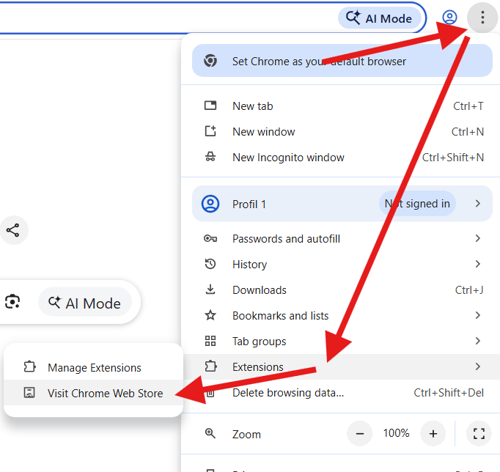
### **Open the Add-ons Manager**
Click the three dots in the toolbar. In the menu, select **Extensions** and then **Visit Chrome Web Store**.
### **Search for easyVision**
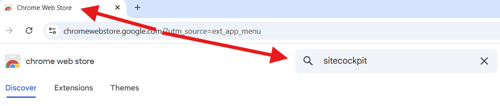
A new page will open.
Enter the term **“easyVision”** in the search bar and confirm by pressing **Enter**.
### **Select easyVision**
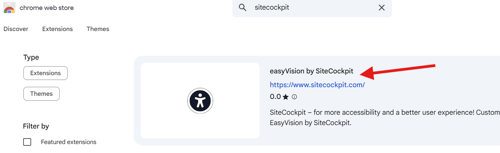
The search results will be displayed.
Click **“easyVision by SiteCockpit”** to open the add-on’s detail page.
### **Add the Add-on to Chrome**
Click the **blue button “Add to Chrome”** to begin the installation process.

### **Confirm Permissions**
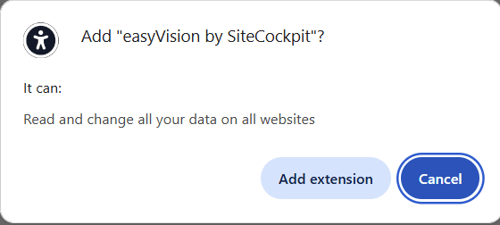
A pop-up window will appear showing the permissions required by the add-on.
Confirm your selection by clicking **“Add extension”**.
### **Complete the Installation**
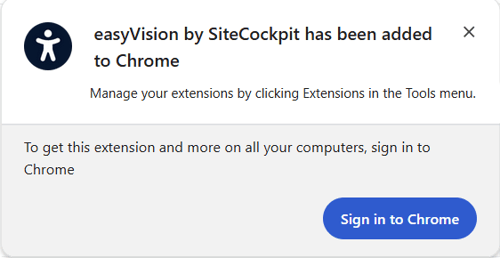
After installation, another small window will appear confirming that **easyVision** has been added to Chrome.
### **Configure easyVision**
The add-on has now been successfully installed.
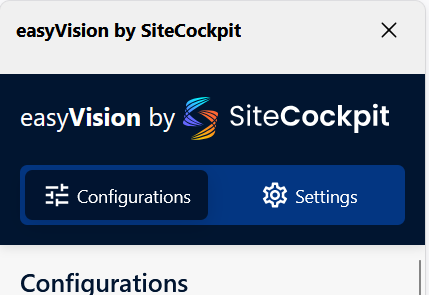
You can configure **easyVision** according to your **personal preferences** and start using it right away. You can find more information following this [link](https://help.sitecockpit.com/en/documentation/integration-easyvision/setup/configuration-of-the-easyvision-extension?hsLang=en)
- [General Information](https://help.sitecockpit.com/en/documentation/general-information?hsLang=en#main-content)
- [Information](https://help.sitecockpit.com/en/documentation/general-information?hsLang=en#information)
- [Dashboard](https://help.sitecockpit.com/en/documentation/general-information?hsLang=en#dashboard)
- [Backend](https://help.sitecockpit.com/en/documentation/backend?hsLang=en#main-content)
- [easyVision](https://help.sitecockpit.com/en/documentation/backend?hsLang=en#easyvision)
- [easyMonitoring](https://help.sitecockpit.com/en/documentation/backend?hsLang=en#easymonitoring)
- [easyMonitorung manual checks](https://help.sitecockpit.com/en/documentation/backend?hsLang=en#easymonitorung-manual-checks)
- [easyMonitorung automatic checks](https://help.sitecockpit.com/en/documentation/backend?hsLang=en#easymonitorung-automatic-checks)
- [easyAI](https://help.sitecockpit.com/en/documentation/backend?hsLang=en#easyai)
- [easyStatement](https://help.sitecockpit.com/en/documentation/backend?hsLang=en#easystatement)
- [Contrast Checker](https://help.sitecockpit.com/en/documentation/backend?hsLang=en#contrast-checker)
- [easyLanguage](https://help.sitecockpit.com/en/documentation/backend?hsLang=en#easylanguage)
- [easyVision integration](https://help.sitecockpit.com/en/documentation/easyvision-integration?hsLang=en#main-content)
- [Setup](https://help.sitecockpit.com/en/documentation/easyvision-integration?hsLang=en#setup)
- [Installlation](https://help.sitecockpit.com/en/documentation/easyvision-integration?hsLang=en#installlation)
- [Browser Extensions](https://help.sitecockpit.com/en/documentation/easyvision-integration?hsLang=en#browser-extensions)
- [Servicepartner](https://help.sitecockpit.com/en/documentation/servicepartner?hsLang=en#main-content)
- [General Information](https://help.sitecockpit.com/en/documentation/servicepartner?hsLang=en#general-information)
- [Stripe](https://help.sitecockpit.com/en/documentation/servicepartner?hsLang=en#stripe)
- [Support](https://help.sitecockpit.com/en/documentation/support?hsLang=en#main-content)
- [FAQ](https://help.sitecockpit.com/en/documentation/support?hsLang=en#faq)
- [Ticket system](https://help.sitecockpit.com/en/documentation/support?hsLang=en#ticket-system)
[](https://www.sitecockpit.com/)
Telefon: +49(0)30 403 64 98 98
E-Mail: kontakt@sitecockpit.com
[mailto:kontakt@sitecockpit.com](mailto:kontakt@sitecockpit.com)
Copyright © 2025, Site Cockpit GmbH