
Overview
The SiteCockpit Score indicates how accessible a website or online shop is according to the Web Content Accessibility Guidelines (WCAG 2.2). The calculation is fully automated, based on established audit methods, and follows a transparent and reproducible methodology.
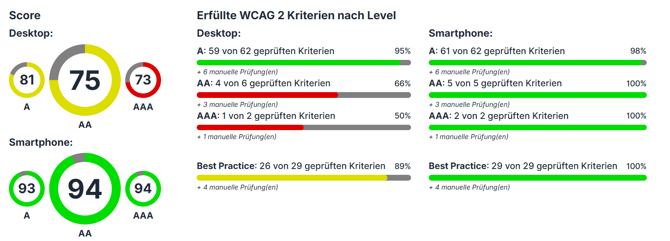
The score is the central metric in the easyMonitoring dashboard and forms the basis for trend analyses, prioritisation, and accessibility documentation.
Audit methodology
Pages monitored in easyMonitoring are audited automatically at regular intervals. SiteCockpit combines leading open-source accessibility engines – including Lighthouse and Axe-Core – with its own processing and evaluation steps. The results are consolidated, deduplicated, and transferred into a unified evaluation matrix from which the score is then calculated.
By combining multiple established audit sources, a significantly higher audit coverage is achieved than a single tool could provide. The exact processing logic is part of the SiteCockpit methodology.
Audit weighting
Each audit – regardless of whether it originates from Lighthouse or Axe-Core – is assigned a numerical weighting that reflects its severity. The official Lighthouse weightings are used. Axe-Core audits are translated into the same scale based on their severity levels:
| Weighting | Meaning | Axe-Core equivalent |
|---|---|---|
| 0 | not present or not determinable | – |
| 1 | minor impact | minor |
| 3 | moderate impact | moderate |
| 7 | serious impact | serious |
| 10 | critical impact | critical |
Visualisation via the gauge icon
The weighting of an audit is represented in the dashboard by a colour-coded gauge icon, allowing the severity to be assessed at a glance:
| Weighting | Colour |
|---|---|
| 0 | no gauge |
| 1 | green |
| 2 – 4 | yellow |
| 5 – 8 | orange |
| ≥ 9 | red |

Audits included in the score
Only audits with a clearly assignable WCAG conformance level (A, AA, or AAA) are used for the score calculation. Best-practice audits without a WCAG reference are not included in the score. They are displayed separately in the dashboard and serve as additional recommendations for quality improvement.
Manual audits Manual audits – meaning checks that cannot be evaluated automatically and require human assessment – are likewise not included in the automated score calculation. They are listed separately in the dashboard and are essential for a complete WCAG conformance assessment.
Number of failed items within an audit The number of failed items within an individual audit has no effect on the score. The only decisive factor is whether the audit is classified as passed or failed.
Example: Whether the colour contrast fails once or fifty times on a page, the effect on the score is identical.
This behaviour matches the Lighthouse methodology. The number of failed items is nevertheless displayed in the dashboard, as it is relevant for prioritising remediation actions.
Score calculation per WCAG level
The score is calculated separately for each of the three WCAG conformance levels:
- Score A – minimum requirement
- Score AA – legal standard under BFSG, EAA, and EN 301 549
- Score AAA – highest conformance level
Which audits are included in which level
| Score | Audits included |
|---|---|
| Score A | audits at level A |
| Score AA | audits at levels A and AA |
| Score AAA | audits at levels A, AA, and AAA |
Due to this cumulative assignment, the following relation holds mathematically:
Score(A) ≤ Score(AA) ≤ Score(AAA)
Calculation formula
The following calculation is performed for each level:
- The passed and failed audits at the respective level are considered (manual audits excluded).
- Sum A = sum of the weightings of all passed and failed audits.
- Sum B = sum of the weightings of the passed audits only.
- Score(Level) = ⌊(B ÷ A) × 100⌋
The result is an integer between 0 and 100.
Significance of the score
What the score reflects
- objective, automated assessment of technical accessibility
- comparability across pages, domains, and points in time
- alignment with established industry standards
- reproducibility for reporting and compliance documentation
What automated tests cannot achieve
The score is an indicator of the state of automatically testable accessibility, but it is not proof of full WCAG or BFSG conformance. A legally reliable assessment always requires an additional manual audit.
According to the current state of the art, automated tests reliably cover only a portion of the WCAG requirements. Certain criteria can only be evaluated through manual review, including:
- semantic meaningfulness of content
- logical reading and meaning sequence
- contextual appropriateness of alt texts
- keyboard operability of complex components
- screen reader compatibility in dynamic applications
Full WCAG conformance therefore requires a combination of automated monitoring and manual auditing.
Frequently asked questions
Does a high score mean that the website is legally compliant and accessible? No. The score never provides a fully reliable statement as to whether a website is completely accessible or legally compliant under BFSG, EAA, or WCAG 2.2. It only reflects the share of criteria that can be automatically tested. A score of 100 therefore means: all automated audits have been passed – not that the page is fully compliant.
Full WCAG conformance can only be determined through a combination of automated monitoring and manual auditing by trained reviewers. Criteria such as semantic meaningfulness, logical reading sequence, or the contextual appropriateness of alt texts require human assessment and cannot be conclusively evaluated by any automated tool.
The score is therefore an indicator and a steering instrument – not a conformance certificate.
Why does the score not reach 100, even though all critical issues have been resolved? Lower-weighted audits (weighting 1 or 3) also factor into the calculation. As long as individual audits fail, the maximum value cannot be reached.
Why does the score change without any changes being made to the code? Possible causes include updated content (e.g. newly added images without alt text), updates to third-party scripts, layout changes made by the CMS, or adjustments to the underlying audit definitions in Lighthouse or Axe-Core.
Why does the SiteCockpit Score differ from the Lighthouse Score? SiteCockpit combines the audits from Lighthouse and Axe-Core and only takes into account audits with a clear WCAG assignment. As a result, the score is more precisely aligned with WCAG conformance and therefore with BFSG requirements.
Are best-practice audits included in the score? No. Best-practice audits are displayed in the dashboard but do not affect the score.
Does the number of failed items within an audit matter? Not for the score – an audit is either classified as passed or as failed. For the prioritisation of remediation measures, the number is shown separately in the dashboard.
Note
The score in SiteCockpit is based on the audit definitions of Lighthouse and Axe-Core in the version currently in use. Updates to the underlying engines may result in new audits being added, existing audits being refined, or weightings being adjusted. Such changes can affect the score even if no modifications have been made to the code of the audited page.