---
title: Capabilities of the service partner
description: Capabilities of a service partner of SiteCockpit
---
[Skip to content](https://help.sitecockpit.com/en/documentation/servicepartner/general-information/capabilities-of-a-servicepartner#main-content)
- [English](https://help.sitecockpit.com/en/documentation/servicepartner/general-information/capabilities-of-a-servicepartner)
- [Deutsch](https://help.sitecockpit.com/de/dokumentation/servicepartner/allgemeine-informationen/moeglichkeiten-eines-servicepartners)
English
Show submenu for translations

- [Tickets](https://hub.sitecockpit.com/portal)
- [Dokumentation](https://help.sitecockpit.com/de/dokumentation)
- [Abmelden](https://146086235.hs-sites-eu1.com/_hcms/mem/logout)
Open main navigation
Close main navigation
- [Tickets](https://hub.sitecockpit.com/portal)
- [Dokumentation](https://help.sitecockpit.com/de/dokumentation)
- [Abmelden](https://146086235.hs-sites-eu1.com/_hcms/mem/logout)
- - [English](https://help.sitecockpit.com/en/documentation/servicepartner/general-information/capabilities-of-a-servicepartner)
- [Deutsch](https://help.sitecockpit.com/de/dokumentation/servicepartner/allgemeine-informationen/moeglichkeiten-eines-servicepartners)
English
Show submenu for translations
- [Contact us](mailto:kontakt@sitecockpit.com)
[Contact us](mailto:kontakt@sitecockpit.com)
How can we help you?
- There are no suggestions because the search field is empty.
1. [Documentation](https://help.sitecockpit.com/en/documentation?hsLang=en)
2. [Servicepartner](https://help.sitecockpit.com/en/documentation/servicepartner?hsLang=en)
3. [General Information](https://help.sitecockpit.com/en/documentation/servicepartner?hsLang=en#general-information)
# Capabilities of the service partner
## Service partners are the point of contact for their customers. They are responsible for integration, configuration, and general questions that their customers may have.
- [**Team**](https://help.sitecockpit.com/en/documentation/servicepartner/general-information/capabilities-of-a-servicepartner#Team)
- [**Partner area and affiliate link**](https://help.sitecockpit.com/en/documentation/servicepartner/general-information/capabilities-of-a-servicepartner#Partner-area-and-affiliate-link)
- [**Confirming service partners**](https://help.sitecockpit.com/en/documentation/servicepartner/general-information/capabilities-of-a-servicepartner#Confirming-service-partners)
- [**Customer management**](https://help.sitecockpit.com/en/documentation/servicepartner/general-information/capabilities-of-a-servicepartner#Customer-management)
- [**Live scan**](https://help.sitecockpit.com/en/documentation/servicepartner/general-information/capabilities-of-a-servicepartner#Live-scan)
- [**Failed scan**](https://help.sitecockpit.com/en/documentation/servicepartner/general-information/capabilities-of-a-servicepartner#Failed-scan)
### **Team**
As a service partner, you will be invited to teams by your customers. This gives you administrative rights and allows you to use all functions to their full extent.
Only one service partner can be added per account.
To receive or send a team invitation, go to “Team settings” in the side menu:

In your team settings, you will find the “Add team member” section. By entering the email address, you can select users and assign them a role. The following roles are available: “Administrator,” “User,” and “Service Partner.”

### Partner area and affiliate link
You can find your partner area by going to “Partner area” in the side menu:

Here you will find an overview of the commission you have received. You will also find your affiliate code, your level, your commission rate, and the number of users you have referred:

Customers are added to your profile using your affiliate code.
### Confirming service partners
When you click on a service partner's affiliate link, you can confirm it:

### Customer management
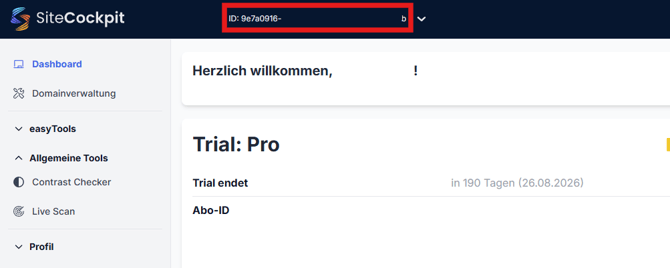
As a service partner, you need access to the customer dashboard to perform your tasks. To do this, open your team overview and select the customer you want to work with:
### Live scan
As a service partner, you can analyze the domains of your existing or potential customers to check their current accessibility status. To do this, go to the “Live Scan” section in the menu:

You can then enter the URL for the website. If password protection is in place, you can also enter the login details:

#### **Failed scan**
If the live scan or the import of the sitemap does not work in monitoring, this may be due to a blocked crawler; in this case, we recommend adding the IP address of the crawler **(49.13.110.142) **to the whitelist to enable access.

- [General Information](https://help.sitecockpit.com/en/documentation/general-information?hsLang=en#main-content)
- [Information](https://help.sitecockpit.com/en/documentation/general-information?hsLang=en#information)
- [Dashboard](https://help.sitecockpit.com/en/documentation/general-information?hsLang=en#dashboard)
- [Backend](https://help.sitecockpit.com/en/documentation/backend?hsLang=en#main-content)
- [easyVision](https://help.sitecockpit.com/en/documentation/backend?hsLang=en#easyvision)
- [easyMonitoring](https://help.sitecockpit.com/en/documentation/backend?hsLang=en#easymonitoring)
- [easyMonitorung manual checks](https://help.sitecockpit.com/en/documentation/backend?hsLang=en#easymonitorung-manual-checks)
- [easyMonitorung automatic checks](https://help.sitecockpit.com/en/documentation/backend?hsLang=en#easymonitorung-automatic-checks)
- [easyAI](https://help.sitecockpit.com/en/documentation/backend?hsLang=en#easyai)
- [easyStatement](https://help.sitecockpit.com/en/documentation/backend?hsLang=en#easystatement)
- [Contrast Checker](https://help.sitecockpit.com/en/documentation/backend?hsLang=en#contrast-checker)
- [easyLanguage](https://help.sitecockpit.com/en/documentation/backend?hsLang=en#easylanguage)
- [easyVision integration](https://help.sitecockpit.com/en/documentation/easyvision-integration?hsLang=en#main-content)
- [Setup](https://help.sitecockpit.com/en/documentation/easyvision-integration?hsLang=en#setup)
- [Installlation](https://help.sitecockpit.com/en/documentation/easyvision-integration?hsLang=en#installlation)
- [Browser Extensions](https://help.sitecockpit.com/en/documentation/easyvision-integration?hsLang=en#browser-extensions)
- [Servicepartner](https://help.sitecockpit.com/en/documentation/servicepartner?hsLang=en#main-content)
- [General Information](https://help.sitecockpit.com/en/documentation/servicepartner?hsLang=en#general-information)
- [Stripe](https://help.sitecockpit.com/en/documentation/servicepartner?hsLang=en#stripe)
- [Support](https://help.sitecockpit.com/en/documentation/support?hsLang=en#main-content)
- [FAQ](https://help.sitecockpit.com/en/documentation/support?hsLang=en#faq)
- [Ticket system](https://help.sitecockpit.com/en/documentation/support?hsLang=en#ticket-system)
[](https://www.sitecockpit.com/)
Telefon: +49(0)30 403 64 98 98
E-Mail: kontakt@sitecockpit.com
[mailto:kontakt@sitecockpit.com](mailto:kontakt@sitecockpit.com)
Copyright © 2025, Site Cockpit GmbH