---
title: Ticket creation (contact form)
description: Ticket creation via the contact form
---
[Skip to content](https://help.sitecockpit.com/en/documentation/support/ticket-system/contact-form#main-content)
- [English](https://help.sitecockpit.com/en/documentation/support/ticket-system/contact-form)
- [Deutsch](https://help.sitecockpit.com/de/dokumentation/support/ticketsystem/kontaktformular)
English
Show submenu for translations

- [Tickets](https://hub.sitecockpit.com/portal)
- [Dokumentation](https://help.sitecockpit.com/de/dokumentation)
- [Abmelden](https://146086235.hs-sites-eu1.com/_hcms/mem/logout)
Open main navigation
Close main navigation
- [Tickets](https://hub.sitecockpit.com/portal)
- [Dokumentation](https://help.sitecockpit.com/de/dokumentation)
- [Abmelden](https://146086235.hs-sites-eu1.com/_hcms/mem/logout)
- - [English](https://help.sitecockpit.com/en/documentation/support/ticket-system/contact-form)
- [Deutsch](https://help.sitecockpit.com/de/dokumentation/support/ticketsystem/kontaktformular)
English
Show submenu for translations
- [Contact us](mailto:kontakt@sitecockpit.com)
[Contact us](mailto:kontakt@sitecockpit.com)
How can we help you?
- There are no suggestions because the search field is empty.
1. [Documentation](https://help.sitecockpit.com/en/documentation?hsLang=en)
2. [Support](https://help.sitecockpit.com/en/documentation/support?hsLang=en)
3. [Ticket system](https://help.sitecockpit.com/en/documentation/support?hsLang=en#ticket-system)
# Ticket creation (contact form)
- [**Description**](https://help.sitecockpit.com/en/documentation/support/ticket-system/contact-form#Description)
- [**Areas**](https://help.sitecockpit.com/en/documentation/support/ticket-system/contact-form#Areas)
- [**Service Desk Overview**](https://help.sitecockpit.com/en/documentation/support/ticket-system/contact-form#Service-Desk-Overview)
- [**Category**](https://help.sitecockpit.com/en/documentation/support/ticket-system/contact-form#Category)
- [**Contact Details**](https://help.sitecockpit.com/en/documentation/support/ticket-system/contact-form#Contact-Details)
- [**Website URL**](https://help.sitecockpit.com/en/documentation/support/ticket-system/contact-form#Website-URL)
- [**Your Message / Inquiry**](https://help.sitecockpit.com/en/documentation/support/ticket-system/contact-form#Your-Message-Inquiry)
- [**Attachment (optional)**](https://help.sitecockpit.com/en/documentation/support/ticket-system/contact-form#Attachment)
- [**Further procedure**](https://help.sitecockpit.com/en/documentation/support/ticket-system/contact-form#Further-procedure)
- [**Ticket processing status**](https://help.sitecockpit.com/en/documentation/support/ticket-system/contact-form#Ticket-processing-status)
- [**New**](https://help.sitecockpit.com/en/documentation/support/ticket-system/contact-form#New)
- [**Under review**](https://help.sitecockpit.com/en/documentation/support/ticket-system/contact-form#Under-review)
- [**Waiting for customer**](https://help.sitecockpit.com/en/documentation/support/ticket-system/contact-form#Waiting-for-customer)
- [**Waiting for support**](https://help.sitecockpit.com/en/documentation/support/ticket-system/contact-form#Waiting-for-support)
- [**Closed**](https://help.sitecockpit.com/en/documentation/support/ticket-system/contact-form#Closed)
### **Description**
You can submit tickets for your project via our Service Desk (accessible at [sitecockpit.com/en/contact](http://sitecockpit.com/en/contact)). This communication channel is the fastest and most effective way to process your requests. Therefore, before sending an email or making a phone call, please consider whether it would be possible to submit a ticket instead.
### **Areas**
- Functionality enhancements (feature requests) and change requests
- Error reports (bugs)
- Support
- Sales inquiries
- Partner-related inquiries
- Product-related inquiries
### **Service Desk Overview**
**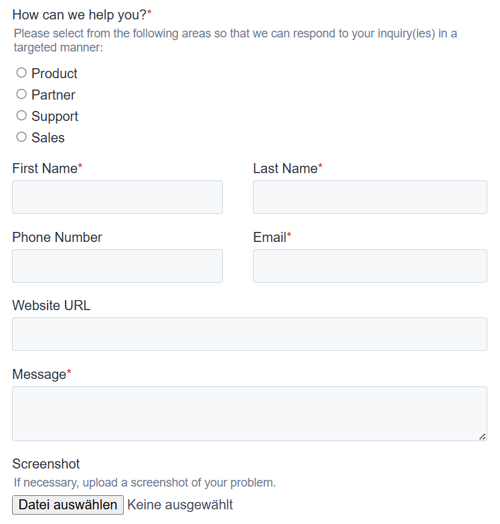**
#### **Category**
Select a category that matches your request. Multiple selections are possible if your request covers several topics.
#### **Contact Details**
Enter your contact information in the respective fields. This helps us assign your request and get in touch with you.
#### **Website URL**
Important for assigning the request.
#### **Your Message / Inquiry**
Describe the content of your request as clearly as possible. Tickets that are not filled out correctly or cannot be clearly reproduced cannot be processed immediately and result in additional effort.
#### **Attachment**
You may add relevant attachments such as meaningful screenshots, short videos, documents, or similar materials.
### **Further procedure**
After creating the ticket, you will not only receive a confirmation email about this attachment, but you will also be informed about every change made.
### **Ticket processing status**
In each ticket status, you have the option of leaving comments relating to the issue.
#### **New**
This status includes tickets that have not yet been processed.
#### **Under review**
As the name suggests, the ticket is undergoing a content, technical, or sales review.
#### **Waiting for customer**
We need feedback to continue processing the ticket. Please note that tickets in this status are automatically closed after 7 days if no comment has been made in the meantime.
#### **Waiting for support**
A ticket to which you have responded in the “Waiting for customer” status will change to this status. Now we're back on the ball.
#### **Closed**
Self-explanatory
- [General Information](https://help.sitecockpit.com/en/documentation/general-information?hsLang=en#main-content)
- [Information](https://help.sitecockpit.com/en/documentation/general-information?hsLang=en#information)
- [Dashboard](https://help.sitecockpit.com/en/documentation/general-information?hsLang=en#dashboard)
- [Backend](https://help.sitecockpit.com/en/documentation/backend?hsLang=en#main-content)
- [easyVision](https://help.sitecockpit.com/en/documentation/backend?hsLang=en#easyvision)
- [easyMonitoring](https://help.sitecockpit.com/en/documentation/backend?hsLang=en#easymonitoring)
- [easyMonitorung manual checks](https://help.sitecockpit.com/en/documentation/backend?hsLang=en#easymonitorung-manual-checks)
- [easyMonitorung automatic checks](https://help.sitecockpit.com/en/documentation/backend?hsLang=en#easymonitorung-automatic-checks)
- [easyAI](https://help.sitecockpit.com/en/documentation/backend?hsLang=en#easyai)
- [easyStatement](https://help.sitecockpit.com/en/documentation/backend?hsLang=en#easystatement)
- [Contrast Checker](https://help.sitecockpit.com/en/documentation/backend?hsLang=en#contrast-checker)
- [easyLanguage](https://help.sitecockpit.com/en/documentation/backend?hsLang=en#easylanguage)
- [easyVision integration](https://help.sitecockpit.com/en/documentation/easyvision-integration?hsLang=en#main-content)
- [Setup](https://help.sitecockpit.com/en/documentation/easyvision-integration?hsLang=en#setup)
- [Installlation](https://help.sitecockpit.com/en/documentation/easyvision-integration?hsLang=en#installlation)
- [Browser Extensions](https://help.sitecockpit.com/en/documentation/easyvision-integration?hsLang=en#browser-extensions)
- [Servicepartner](https://help.sitecockpit.com/en/documentation/servicepartner?hsLang=en#main-content)
- [General Information](https://help.sitecockpit.com/en/documentation/servicepartner?hsLang=en#general-information)
- [Stripe](https://help.sitecockpit.com/en/documentation/servicepartner?hsLang=en#stripe)
- [Support](https://help.sitecockpit.com/en/documentation/support?hsLang=en#main-content)
- [FAQ](https://help.sitecockpit.com/en/documentation/support?hsLang=en#faq)
- [Ticket system](https://help.sitecockpit.com/en/documentation/support?hsLang=en#ticket-system)
[](https://www.sitecockpit.com/)
Telefon: +49(0)30 403 64 98 98
E-Mail: kontakt@sitecockpit.com
[mailto:kontakt@sitecockpit.com](mailto:kontakt@sitecockpit.com)
Copyright © 2025, Site Cockpit GmbH